If your main output is short-form video, compare the AI video tools for Instagram Reels and YouTube Shorts. For repeatable workflows beyond content creation, explore AI automation for business.
AI Creative Tools for Social Media: From Static Posts to Motion Creatives
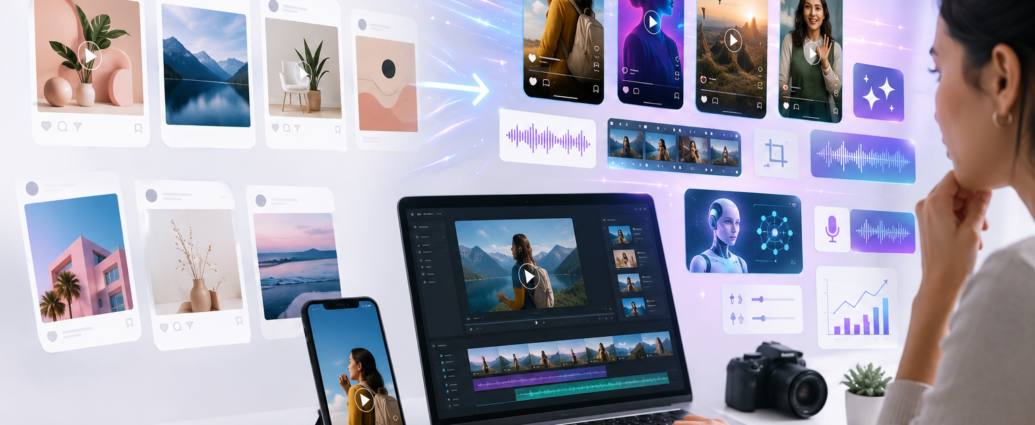
AI creative tools are changing how brands, creators, marketers, and agencies produce social media content. Social media is no longer limited to static posts, simple banners, and basic video edits. Today, a single campaign may need an Instagram Reel, a YouTube Short, a product video, a motion poster, an animated carousel, a talking avatar, a voiceover, subtitles, multiple size formats, and sometimes even different versions for ads.
Naturally, that creates a lot of pressure.
The real challenge is not only coming up with ideas. More importantly, the challenge is producing those ideas fast enough without making the content look cheap, repetitive, or rushed.
This is where AI creative tools become useful. With the right tools, you can turn a blog into a video, a product image into a motion creative, a script into a Reel, a prompt into a visual concept, or a simple static design into something that feels more alive.
However, these tools are not here to replace creative thinking. Instead, they help reduce the slow parts of production so creators can make more content without starting from zero every time.
Another useful part is accessibility. You do not need to be a professional video editor to use many of these tools. Some are built for marketers, while others are built for creators, designers, educators, and businesses that want better content without hiring a full production team.
Let’s look at the best AI creative tools that can help you move from static posts to motion creatives.
Why AI Creative Tools Matter for Social Media
Static posts still work. A clean design, strong message, and good visual can still perform well.
However, motion content has become harder to ignore.
A moving product image, animated text, AI-generated B-roll, short explainer video, or avatar-led clip can grab attention faster than a normal graphic. On platforms like Instagram, Facebook, YouTube Shorts, TikTok, and LinkedIn, motion adds another layer of engagement.
That does not mean every post needs to become a video. In fact, forcing every idea into a video format can make your content feel unnecessary and overproduced. Still, if your brand only publishes static creatives, your content may start feeling flat over time.
Motion helps in several practical ways. For example, it can make product photos more interesting, turn educational content into short explainers, convert a blog post into video snippets, and help service businesses explain complex ideas. In addition, it gives marketers more creative variations for ads and helps creators repurpose one idea into many formats.
As a result, AI creative tools are becoming useful for production speed, visual experimentation, and content repurposing.
Best AI Creative Tools for Social Media Content Creation
The best tool depends on the kind of content you want to create. Some tools are better for turning blogs into videos. Others are better for image-to-video, text-to-video, motion graphics, AI avatars, voiceovers, captions, or browser-based editing.
Instead of looking for one tool that does everything, it is better to build a workflow. For example, you may use one tool to create the first video draft, another to add motion, another for voiceover, and another for final editing.
Below are some of the most useful AI creative tools for social media content creation.
1. Pictory AI — Best for Turning Blogs, Scripts, and Ideas into Social Videos
Pictory AI is one of the most useful tools for bloggers, affiliate marketers, coaches, educators, small businesses, and marketers who want to turn written content into videos.
Its biggest strength is content repurposing.
For example, you can take a blog post, article, script, URL, or written idea and convert it into a video with visuals, captions, voiceovers, and scenes. This is especially helpful when you already have written content but do not want it to stay only as a blog post.
One blog article can become a short explainer video, a YouTube Short, an Instagram Reel, or a social media promo clip. Therefore, Pictory AI is a strong choice for people who want to create more video content without recording everything manually.
For affiliate marketers, this can be especially useful. Instead of only publishing written reviews or comparison articles, you can turn those same ideas into short video assets for Instagram, YouTube, Facebook, and LinkedIn.
Best features
Script-to-video, blog-to-video, URL-to-video, text-to-video, image-to-video, auto captions, AI voiceovers, video highlights, and text-based video editing.
Pros
Pictory AI is beginner-friendly and works well for people who already create written content. Moreover, it is useful for bloggers, affiliate marketers, educators, YouTubers, coaches, and small businesses. Since it helps repurpose existing content, you can save time instead of creating every video from scratch.
Cons
The first AI-generated output may still need editing. For instance, you may need to adjust scenes, rewrite lines, change visuals, or refine voiceovers to match your brand style. In other words, it is best used as a fast starting point, not as a final one-click editor.
Best for
Blog-to-video, script-to-video, affiliate content, educational videos, social media videos, YouTube Shorts, Instagram Reels, and content repurposing.
2. Canva — Best for Branded Social Media Creatives
Canva is already one of the most popular tools for social media design. With its AI features and video tools, it has become even more useful for brands and creators who want to create static and motion content in one place.
The biggest advantage of Canva is simplicity. You can design posts, carousels, thumbnails, presentations, videos, product visuals, and social media ads without needing advanced design software.
For social media teams, Canva is helpful because it supports brand kits, templates, animations, stock elements, video editing, and AI video generation. In practice, this means you can take a static design and add simple motion effects, animated elements, transitions, or video-style layouts.
Another advantage is consistency. When a brand uses the same fonts, colors, and visual structure across posts, the content looks more professional. Canva makes that easier for teams that need to produce content regularly.
Best features
AI video generator, Magic Media, templates, animations, brand kits, social media resizing, video editor, product video templates, and design-to-video workflows.
Pros
Canva is easy to use and ideal for non-designers. In addition, it helps maintain brand consistency and allows teams to create content quickly. It is useful for static posts, motion posts, product videos, event creatives, thumbnails, and simple Reels.
Cons
Canva creatives can look templated if you do not customize them properly. Since many people use similar layouts, brands need to edit colors, typography, spacing, and visuals carefully.
Best for
Small businesses, social media managers, coaches, educators, content teams, and brands that need quick, clean, branded creatives.
3. CapCut — Best for Reels, Shorts, and Fast Video Editing
CapCut is one of the easiest tools for short-form video editing. It is especially useful for Instagram Reels, YouTube Shorts, TikTok-style videos, product demos, talking-head videos, and quick social edits.
The platform offers AI-powered tools such as auto captions, text-to-video, AI voiceovers, templates, background removal, and automated editing support. Because of this, it works well for creators who want to move fast.
For social media content creation, CapCut is useful because it helps turn raw footage into platform-ready videos. You can trim clips, add captions, use effects, improve pacing, add music, and export videos in vertical format.
Meanwhile, creators who are not comfortable with complex software can still create polished videos using mobile-friendly tools and ready-made workflows.
Best features
Auto captions, AI video generation, text-to-video, AI voiceover, templates, background remover, effects, transitions, and mobile-friendly editing.
Pros
CapCut is fast, easy, and perfect for daily content creation. It works well for creators and small businesses that need quick Reels and Shorts without using complex editing software.
Cons
Many CapCut templates and effects are widely used. As a result, videos can look repetitive if you rely too much on trends. For premium brand videos, you may need more manual editing and a stronger visual direction.
Best for
Instagram Reels, YouTube Shorts, creator videos, product demos, short-form ads, and social media editing.
4. Runway — Best for Cinematic AI Video and Creative B-Roll
Runway is a powerful AI video tool for creators who want more cinematic, experimental, or high-end visuals.
Unlike basic editing tools, Runway is better suited for generating creative scenes, AI B-roll, stylized videos, visual effects, product concepts, and cinematic shots that would be expensive or difficult to shoot manually.
For social media, this can be very useful. A fashion brand can create atmospheric campaign shots, while a tech company can generate futuristic product visuals. Similarly, a creator can produce B-roll that matches the mood of a video without spending hours searching through stock footage.
Runway is not always the quickest option for everyday posts. However, when a brand needs something visually different, it can help create standout content.
Best features
Text-to-video, image-to-video, video editing tools, AI-generated scenes, creative controls, visual effects, and cinematic video generation.
Pros
Runway is excellent for premium AI visuals. It gives creators more creative freedom and can help produce unique video assets that stand out from normal template-based content.
Cons
There is a learning curve. The best results often require testing different prompts and refining outputs. Therefore, it may not be the fastest tool for everyday basic social media posts.
Best for
Cinematic social videos, AI B-roll, brand campaigns, product visuals, experimental Reels, and creative storytelling.
5. Luma AI — Best for Image-to-Video and Motion Concepts
Luma AI is useful for turning images and prompts into cinematic motion videos.
If you already have a product photo, brand image, poster, character design, or campaign visual, Luma can help bring it to life. This is useful for social media because static images can be turned into moving visuals for Reels, Shorts, stories, and ads.
For example, a product image can become a smooth motion shot. A poster can become a campaign teaser. A travel image can become a cinematic scene. Likewise, a brand visual can become a short animated clip.
In many cases, this type of motion is enough to make a creative feel fresh without producing a full video shoot.
Best features
Image-to-video, text-to-video, cinematic motion, prompt-based video creation, motion direction, and high-quality visual generation.
Pros
Luma AI is strong for visual motion and cinematic image animation. It is helpful for designers, brands, agencies, and creators who want to make static visuals feel more dynamic.
Cons
Luma is not a complete editing tool. You may still need another editor like CapCut, VEED, Canva, or Premiere Pro to add captions, music, voiceover, and final polish.
Best for
Image-to-video content, product motion creatives, campaign teasers, visual storytelling, mood videos, and AI-generated B-roll.
6. Pika — Best for Creative Image-to-Video Effects
Pika is a good tool for creators who want fun, eye-catching, and effect-driven videos from images.
It is especially useful when you want to create social content that feels playful, surprising, or visually unusual. Pika is known for creative effects that can transform photos into short videos with motion and dramatic visual changes.
For social media, this can work well for attention-grabbing posts, experimental Reels, product effects, meme-style content, and creator-led videos.
On the other hand, this style may not suit every brand. A serious healthcare, finance, or B2B brand may need a more restrained visual approach. Still, for lifestyle, fashion, entertainment, creator, and product-led content, it can be a useful creative tool.
Best features
Image-to-video, text-to-video, creative visual effects, stylized transformations, and short AI video generation.
Pros
Pika is useful for creating scroll-stopping effects. It can make simple images feel more dynamic and interesting for short-form platforms.
Cons
Some effects may feel too playful or casual for serious industries. Therefore, it works best when the creative direction matches the brand personality.
Best for
Creative Reels, fun product videos, visual effects, trend-style content, experimental motion posts, and creator content.
7. Adobe Firefly and Adobe Express — Best for Brand-Safe Creative Workflows
Adobe Firefly and Adobe Express are useful for creators and businesses that want AI creative tools inside a more professional design ecosystem.
Adobe Firefly can help with text-to-video and image-to-video generation. Adobe Express, meanwhile, is useful for creating social posts, videos, flyers, Reels, and branded content quickly.
Together, these tools can support teams that want creative speed but also care about quality, brand consistency, and commercial use.
For agencies and brand teams, this matters because social media content is not only about looking good. It also needs to match brand guidelines, campaign goals, and platform requirements.
Best features
Text-to-video, image-to-video, generative visuals, AI-powered design tools, social media templates, video editing, and brand-friendly creative workflows.
Pros
Adobe tools are useful for professional creators, agencies, and brands. They offer better control than many simple template tools and work well for polished marketing content.
Cons
Adobe tools may feel slightly more advanced for beginners. If you only need quick daily content, Canva or CapCut may feel faster.
Best for
Agencies, designers, brand teams, professional social content, ad creatives, campaign visuals, and polished motion graphics.
8. HeyGen — Best for AI Avatars and AI Model Creation
HeyGen is useful when you want to create videos with AI avatars, digital presenters, or AI models.
This can be helpful for brands that need explainer videos, training content, product walkthroughs, multilingual videos, or social media clips where a person is speaking but you do not want to shoot a real video every time.
AI avatars can also help businesses create consistent presenter-style content without needing a camera, studio, or repeated recording sessions.
However, avatar videos should be used carefully. If the script is weak, even the best avatar will feel artificial. Similarly, if the avatar does not match the brand tone, the video can feel disconnected from the audience.
Best features
AI avatars, text-to-video, voice generation, avatar customization, multilingual video creation, captions, and presentation-style videos.
Pros
HeyGen is useful for businesses that want human-like video presenters. It can save time for training videos, explainers, product demos, onboarding content, and educational clips.
Cons
AI avatars can feel artificial if not used properly. Brands should also avoid misleading viewers or using someone’s likeness without consent.
Best for
AI presenter videos, AI model creation, training content, product explainers, multilingual videos, corporate communication, and educational social clips.
9. ElevenLabs — Best for AI Voiceovers
ElevenLabs is not a complete social media design tool, but it is very useful for voiceovers.
Many short videos fail because the audio feels flat, unclear, or robotic. A good voiceover, however, can make an explainer video, product video, or faceless Reel feel much more professional.
ElevenLabs can help generate realistic AI voices in multiple languages and styles. It is useful for creators who do not want to record their own voice or need different voice tones for different types of content.
For example, a brand may use one voice style for educational videos and another for product promos. Similarly, a creator may use voiceovers to turn written ideas into faceless videos.
Best features
Text-to-speech, realistic AI voices, multilingual voice generation, voice cloning, dubbing, and voiceover tools.
Pros
ElevenLabs produces strong voice quality and is useful for faceless videos, explainers, educational content, and multilingual campaigns.
Cons
AI voiceovers still need human review. A voice may sound technically good but still not match the emotional tone of the content. For personal branding, a real voice may build more trust.
Best for
Faceless videos, explainer Reels, product narration, YouTube Shorts, educational content, and multilingual voiceovers.
10. VEED — Best for Browser-Based AI Video Creation
VEED is a browser-based video creation platform that combines AI video generation, editing, subtitles, avatars, dubbing, and voice tools.
It is useful for marketers, solopreneurs, educators, and small teams that want one online workspace for video creation. You can generate videos from scripts or images, add subtitles, use AI voiceovers, clean audio, translate videos, and prepare content for social platforms.
For social media teams, VEED is useful because it reduces the need to jump between many different tools.
In addition, its browser-based workflow makes collaboration easier. A team member can work on subtitles, another can check the video, and someone else can prepare the final export without needing heavy editing software.
Best features
Text-to-video, image-to-video, AI avatars, auto subtitles, AI voiceovers, dubbing, video translator, audio cleanup, and browser-based editing.
Pros
VEED is easy to access and combines many useful features in one platform. It is good for marketers who need practical, ready-to-post videos.
Cons
Because it does many things, it may not be the absolute best at every single task. A dedicated cinematic AI tool may produce stronger visuals, while a dedicated caption tool may offer more caption styling.
Best for
Marketing videos, social media clips, subtitles, browser editing, explainer content, and team workflows.
How AI Creative Tools Turn Static Posts into Motion Creatives
One of the biggest advantages of AI creative tools is that they help brands get more value from existing content.
A static poster does not have to remain static. It can become a motion poster. A blog does not have to remain only a blog. It can become a video script, a short explainer, or a series of social clips. A product photo can become an animated product showcase. A written idea can become a faceless Reel with captions and voiceover.
This matters because most brands already have content. They have product images, blogs, service pages, FAQs, customer questions, presentation slides, testimonials, and social media posts. The challenge is not always creating something new. Sometimes, the better approach is to reuse what already exists in a more engaging format.
For example, a blog article can be converted into a video using Pictory AI. The same video can then be resized or polished in CapCut or VEED. A product image can be animated using Luma AI or Pika. A branded social layout can be created in Canva. Finally, a voiceover can be added using ElevenLabs.
As a result, one idea can become multiple creative assets without needing a full production team.
How to Choose the Right AI Creative Tools
The right tool depends on your content style, team size, budget, and publishing goal.
For written content repurposing, Pictory AI is a strong choice because it can help turn blogs, scripts, and URLs into social videos.
For branded static and motion posts, Canva is a practical option.
When the main goal is Reels and Shorts, CapCut is one of the fastest tools to start with.
For cinematic AI visuals, Runway or Luma AI can be more suitable.
If you want fun image-to-video effects, Pika can help.
For professional and brand-safe creative workflows, Adobe Firefly and Adobe Express are strong options.
When presenter-style videos are needed, HeyGen is useful.
For voiceovers, ElevenLabs is a strong choice.
Finally, if you want a browser-based video workspace, VEED is worth exploring.
The smart approach is not to use every tool. Instead, build a workflow based on your content type, team size, publishing frequency, and brand style.
A Simple AI Creative Tools Workflow for Social Media Teams
A practical workflow can start with one content idea. It could be a blog post, product feature, customer problem, educational point, or campaign message.
First, use Pictory AI to turn the idea or blog into a short video draft.
Next, use Canva to create branded visuals, thumbnails, or motion layouts.
After that, use Runway, Luma, or Pika if you need special AI-generated visuals or image-to-video motion.
For narration, ElevenLabs can help create a polished voiceover.
Then, use CapCut or VEED to add captions, trim the video, resize it, and prepare final versions for Instagram, YouTube Shorts, LinkedIn, Facebook, or ads.
With this workflow, one idea can become multiple assets: a static post, a motion post, a Reel, a Short, a story, an ad creative, and a blog-supported video.
That is the real power of AI creative tools for social media content creation.
Final Thoughts on AI Creative Tools
AI creative tools are changing how social media content is produced.
Earlier, a static post was often the final output. Today, that same static idea can become a motion poster, a short video, an AI voiceover clip, an avatar-led explainer, or a full social media campaign.
Still, the tool is only part of the process.
A weak idea will still feel weak, even if AI makes it move. A generic script will still sound generic, even with a good voiceover. Likewise, a bad creative direction will still look bad, even with the most advanced AI video generator.
The best results come when human thinking and AI production work together.
Use AI to save time. Use it to test faster. Use it to repurpose content. Most importantly, use it to create motion from static ideas without losing the strategy behind the content.
In the end, AI can help you produce faster, but the message, taste, and final decision should still remain human.
That is how brands and creators can move from simple static posts to stronger motion creatives without losing quality or originality.